One Calendar, Five Platforms: How Omni Socials Replaces Your Whole Posting Stack
Plan, write, design, and schedule across Instagram, TikTok, LinkedIn, X, and YouTube from one dashboard. No more browser tabs, no more spreadsheets.
The hidden tax of "just post it"
Most teams underestimate the real cost of social posting. Reformatting a single piece of content for five platforms, writing five captions, tweaking aspect ratios, scheduling, then logging performance the next morning, adds up to three to five hours a week per channel. For a single person team that is half a working day, every week, on logistics.
Omni Socials gives you that day back.
The unified calendar
The core of Omni Socials is a single calendar that shows every scheduled post across Instagram, TikTok, LinkedIn, X, and YouTube. You see your whole content week at a glance, color coded by platform.
Drag and drop to reschedule. Click to edit. The same asset can publish to all five channels with platform specific captions, hashtags, and aspect ratios applied automatically.
AI captions that respect platform voice
LinkedIn does not sound like TikTok. TikTok does not sound like LinkedIn. Omni Socials writes platform native captions from a single source brief.
You write one short prompt or paste your hook. The AI returns:
- A LinkedIn caption that opens with a hook line, builds a short narrative, and ends with a soft prompt.
- A TikTok caption under 150 characters with three relevant hashtags.
- An Instagram caption with line breaks, emoji rhythm, and a 12 tag set pulled from your saved hashtag groups.
- An X post under 280 characters with optional thread continuation.
- A YouTube description with timestamps placeholders and a closing CTA.
Edit any of them. Save your edits as a style and the AI will match your voice on the next post.
Visual calendar, not a spreadsheet
The week view shows post previews as actual visual cards. You can spot a thumbnail clash, a caption that runs long, or a Friday with no scheduled content at a glance.
Color coding by content pillar (educational, behind the scenes, product, social proof) keeps your mix balanced. Most healthy creator accounts run a 4 to 1 ratio of value posts to promo posts. Omni Socials shows you that ratio as a chart on the dashboard.
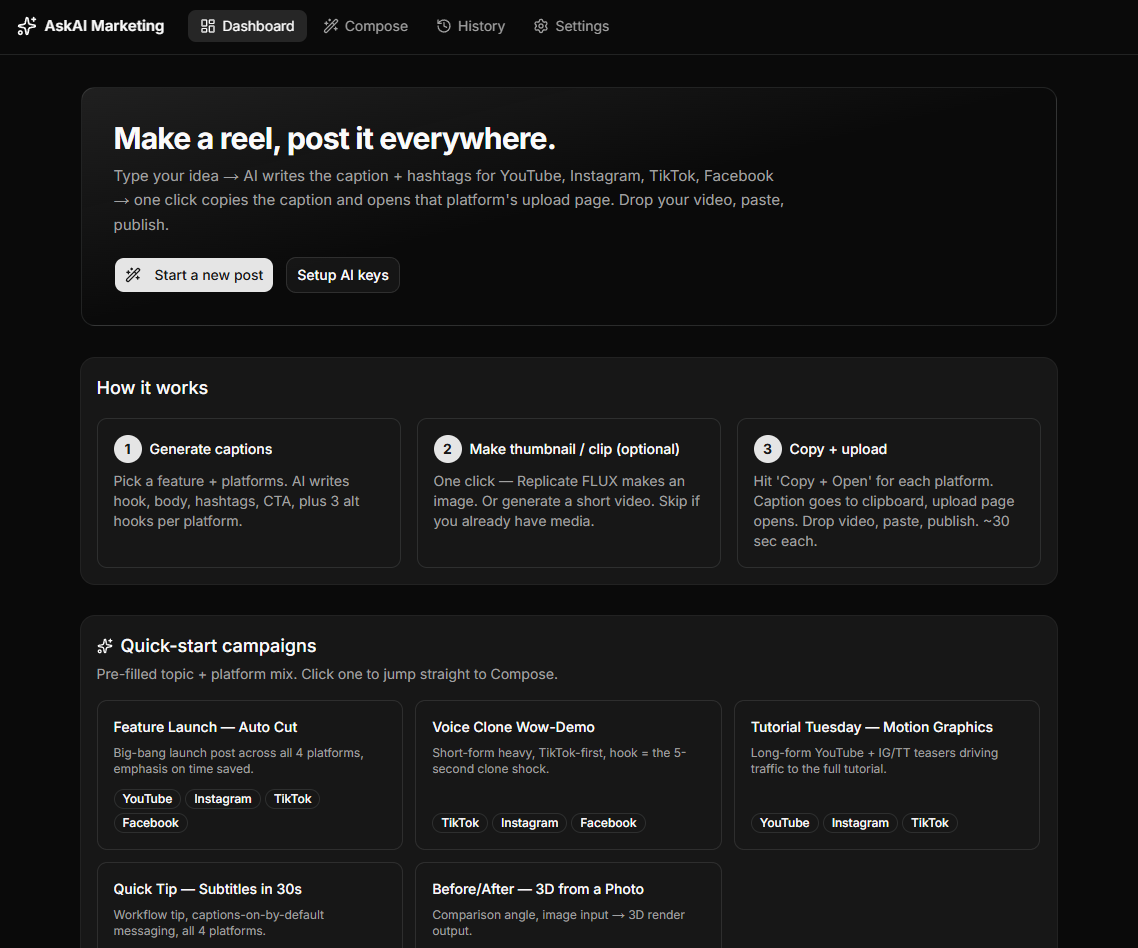
Quick start campaigns
To get teams shipping in week one, Omni Socials includes pre filled campaign templates:
- Feature Launch · Auto Cut: big bang launch post across all four platforms, emphasis on time saved.
- Voice Clone · Wow Demo: short form heavy, TikTok first, with a five second clone shock as the hook.
- Tutorial Tuesday · Motion Graphics: long form YouTube plus IG and TT teasers driving traffic to the full tutorial.
- Quick Tip · Subtitles in 30s: workflow tip, captions on by default, all four platforms.
- Before / After · 3D from a Photo: comparison angle, image input to 3D render output.
Pick a template, swap in your asset, hit publish.
Performance, in plain English
Every Monday morning, you get a single email:
- Your three best performing posts last week, with one line on why we think each worked.
- Your worst performing post, with a coachable note.
- Your follower delta per platform.
- Your engagement rate trend across the last four weeks.
This is the reporting we wished existed when we started managing accounts. Numbers without context are noise. Context without numbers is a hunch. Omni Socials gives you both.
Cross posting with platform brains
When you cross post a vertical video to TikTok and Reels, Omni Socials does not just upload the same file twice. It:
- Applies TikTok safe zones (top 14%, bottom 18%).
- Generates Reels appropriate cover frame.
- Strips watermarks and TikTok specific overlays from the YouTube Shorts version.
- Pulls subtitles from your master file and burns them in the brand font for IG, where soft subtitles do not always show.
These are the details that quietly separate a clean account from a sloppy one.
Who Omni Socials is for
- Solo creators who want to look like they have a team behind them.
- Small studios who need to manage three or four client accounts without three or four scheduling tools.
- In house marketing teams that have been duct taping Notion + Buffer + Canva for too long.
Try it free
We open a limited number of free workspaces every month. Ask for access here.
Have a project that needs this?
Tell us what you are building. We reply within 24 hours.
The service behind this
Marketing Software
When the workflow is the bottleneck, buying another subscription rarely fixes it. We build the tool that does the specific thing your team keeps doing by hand.