How Ask AI Turns 90 Minutes of Footage Into 12 Reels Inside Premiere Pro
A walk through the Ask AI panel: auto cut, silence removal, motion graphics in 2D and 3D, voice cloning, and on brand subtitles, all without leaving Premiere.
The problem with long form video
A single 90 minute podcast or webinar can hold ten or more share worthy moments. Surfacing those moments by hand is the slowest part of any video team's week. The ratio is brutal: an hour of finished short form pulled out of a long form interview usually costs four to six hours of human editing time.
Ask AI was built to flip that ratio.
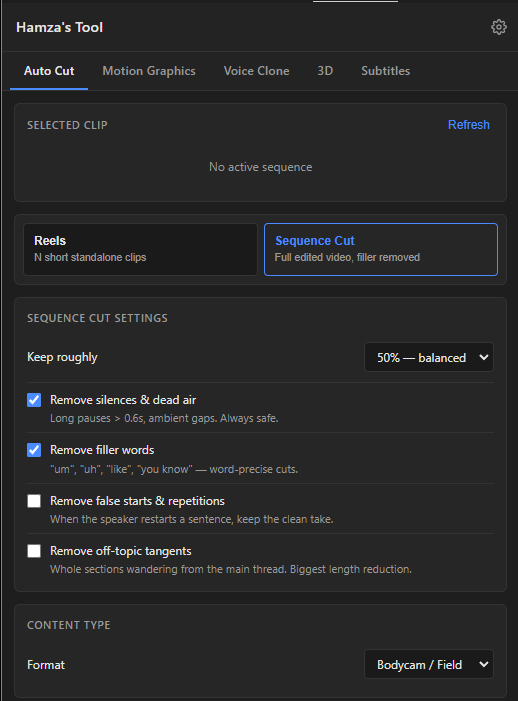
What Ask AI actually does
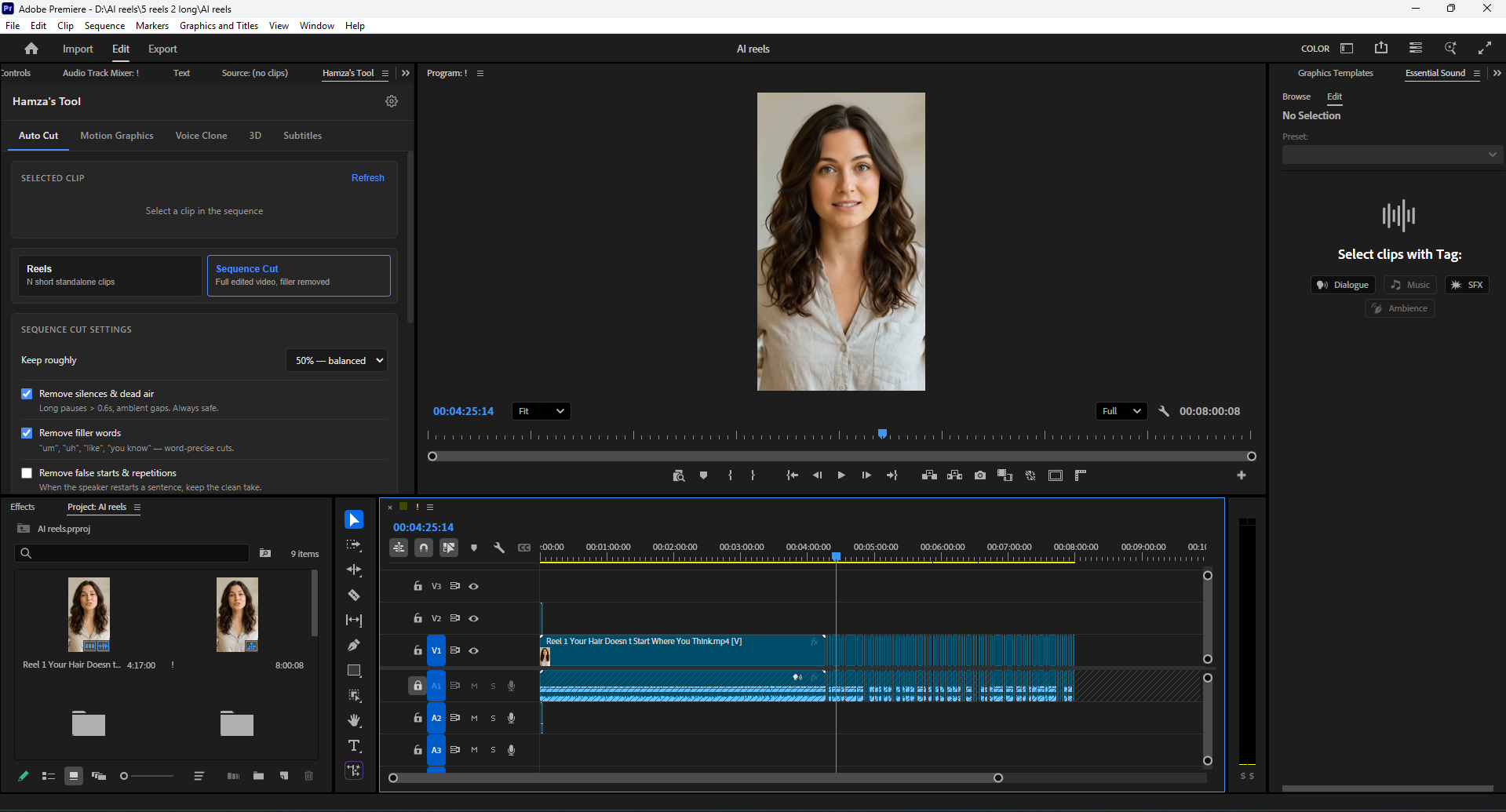
Ask AI is a panel that lives inside Adobe Premiere Pro. It does not replace your editor's judgment. It removes the busywork before the judgment starts.
1. Auto cut reels from long videos
Drop a long clip on the timeline, pick a target length (15, 30, 60, or 90 seconds), and Ask AI returns a ranked list of standalone reels. Each one is a clean, self contained moment with a hook, a payload, and a closing beat. You preview, drag the keepers to your sequence, and trim from there.
Under the hood we use transcript scoring, speaker turn detection, and a hook strength model that we retrained on the kind of content our clients actually post.
2. Raw cuts with silence removal
For longer talking head edits, the Sequence Cut mode does something simpler but equally valuable. It walks the audio, flags every pause longer than six tenths of a second, every "um" and "uh" and "like" and "you know," and removes them in place. The result is a single tightened sequence you can color, score, and finish.
You keep full control over the threshold. Most editors land somewhere around 50 percent of original duration.
3. Motion graphics in 2D and 3D
Need a lower third, an animated stat callout, or a 3D product reveal? The Motion Graphics tab generates a sequence preset, complete with keyframes and a text layer that maps to your brand kit. Swap the copy, render, done.
4. Voice cloning for narration
For voiceover pickups, B roll narration, or full host scripts, the Voice Clone tab samples 30 seconds of your voice, then generates new narration from a script you write. You stay the voice of your channel even on days you do not have time to record.
5. Subtitles and captions
Burned in subtitles in your brand font, with style presets and a one click "make all uppercase" toggle. SRT export ships in the same pass for YouTube and TikTok native captions.
A real shoot, end to end
Last month we cut a 72 minute fireside chat into 14 reels, two long form recaps, and one 90 second teaser. Ask AI did the rough work in roughly 18 minutes. Our editor spent another two and a half hours refining hooks, color, sound, and graphics. Total turnaround: under three hours from raw upload to publish ready files. Old workflow on the same shoot would have eaten a full day and a half.
Who Ask AI is for
We built Ask AI for three groups:
- Founders and operators who want to publish weekly but cannot justify hiring full time editors.
- Editors who want to spend their hours on creative decisions, not on dragging the playhead.
- Agencies that need to scale short form output without scaling headcount.
If your team already lives in Premiere Pro, the install is a single panel and the learning curve is one shoot.
Want a live demo?
We run private demos every Thursday. Reach out and we will set you up.
Have a project that needs this?
Tell us what you are building. We reply within 24 hours.
The service behind this
Video Editing
Editing produced at volume without looking produced at volume. Vertical first, because that is where the attention is, with longform and motion when the story needs it.